
Flexible Display Layouts
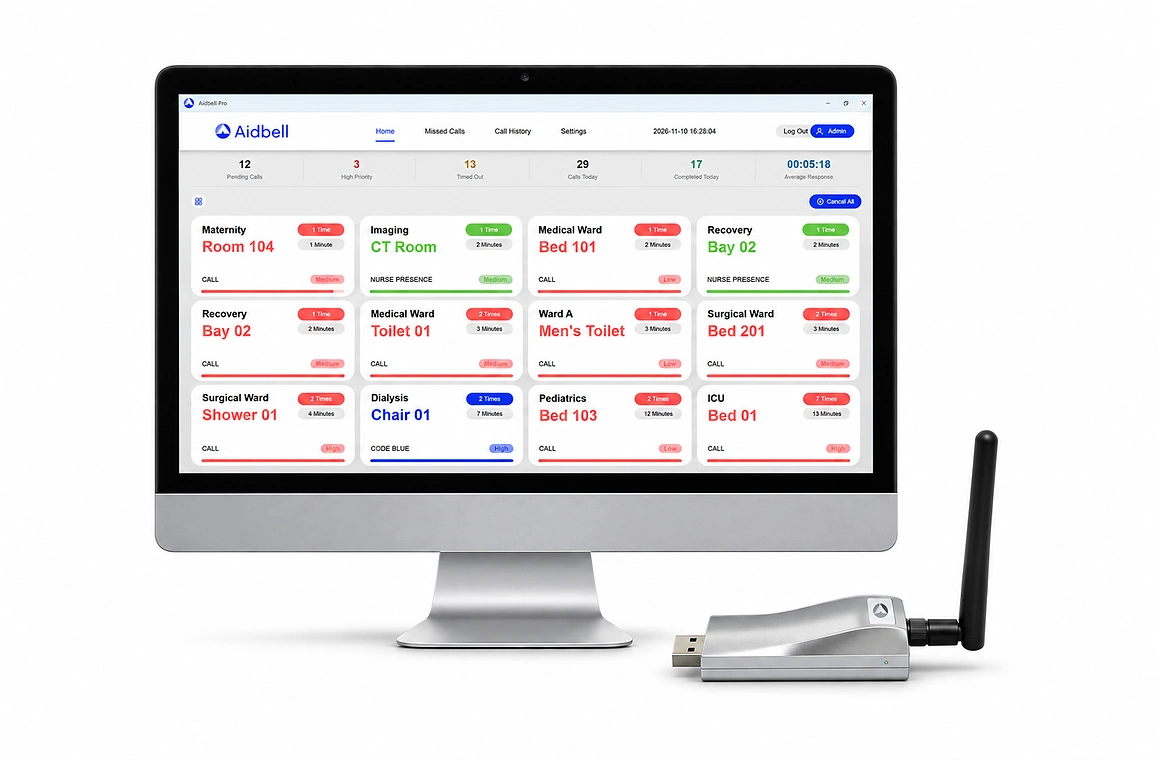
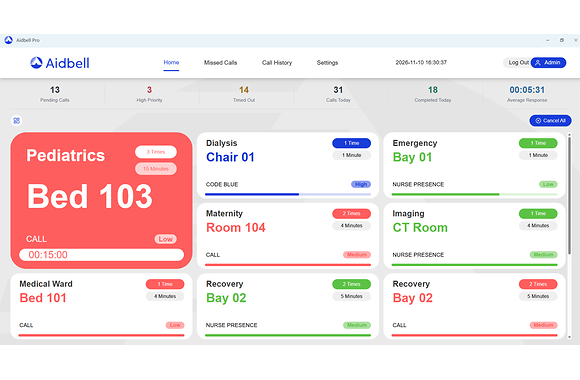
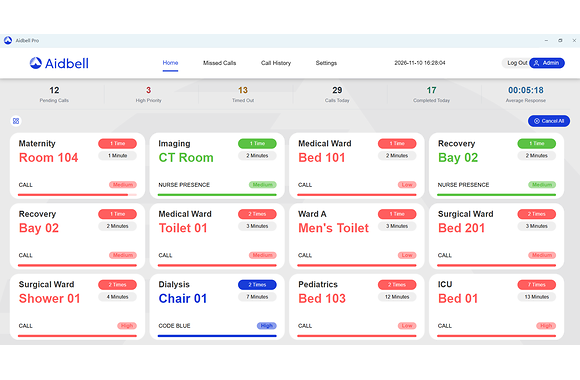
Choose a large highlighted-call layout or a uniform grid. View call locations, waiting times, call counts, service types and priority levels in a clear, organized display.
One Software. Multiple Screens. Clear Call Information.
Aidbell Pro is professional management software developed for Aidbell wireless nurse call system. Connect the compact Aidbell USB dongle and launch the software—no complicated driver installation or time-consuming setup is required.
Incoming calls are displayed in real time with call location, call time, pending time, service type, and priority. Multiple compatible terminals can receive the same calls simultaneously, helping healthcare staff identify and respond quickly.
Customers can use existing hospital equipment or purchase suitable display devices locally, providing greater flexibility while reducing hardware and international shipping costs.
Compatible Devices: Android tablets, Android TVs, Windows PCs, and all-in-one computers; Smartphones are not supported.
System Compatibility: Aidbell 433 MHz and LoRa Nurse Call Systems only.
Choose a large highlighted-call layout or a uniform grid. View call locations, waiting times, call counts, service types and priority levels in a clear, organized display.
Receive the same calls simultaneously on multiple compatible terminals, allowing staff to view call information at different locations.
Run Aidbell Pro on compatible Android tablets, Android TVs, Windows PCs and all-in-one computers. Use suitable existing equipment or source devices locally. The Android app does not support smartphones.
Search and filter call records, export data to Excel, and analyze call volume, response times, response rates and staff performance.
Customize service types, colors, ringtones and volume. Upload alert sounds and choose mute, play-once or repeat modes. Use audible alerts and pop-up notifications to help staff notice incoming calls.
Connect the compact Aidbell USB receiver and launch the software without complicated driver installation. Use a compatible display device to create your nurse call monitoring station.
Register call buttons individually or in batches, reducing setup time for projects with a large number of calling points.
Choose from 10 interface languages. Enter call locations and service information in languages supported by your device to suit local project requirements.
Export and import system settings to back up your configuration or transfer it to another compatible device, reducing repeated setup work.
Create user accounts and assign role-based permissions to control access to software functions and protect important system settings from unauthorized changes.
Assign selected call buttons to specific staff members and shifts. Review response times and staff performance to support day-to-day nurse call management.
Identify compatible call buttons with low batteries so staff can arrange timely replacement and help maintain reliable system operation.
Aidbell Pro is designed for the following Aidbell wireless nurse call systems.
A cost-effective and easy-to-install solution for clinics, nursing homes and small to medium-sized healthcare facilities.
A long-range wireless solution designed for hospitals, multi-floor buildings and larger healthcare facilities.
Aidbell Pro is professional display and management software for Aidbell wireless nurse call systems. It displays incoming calls in real time and provides call history, data analysis, system configuration, staff assignments and user management.
Aidbell Pro is compatible with Aidbell 433 MHz and LoRa wireless nurse call systems. It is not compatible with Aidbell POCSAG systems.
Aidbell Pro can run on compatible Android tablets, Android TVs, Windows PCs and all-in-one computers in different screen sizes. The Android version does not support smartphones.
Yes. Multiple compatible display terminals can receive the same nurse calls simultaneously, allowing calls to be monitored from different locations.
No. Connect the compatible Aidbell USB wireless receiver and launch the software. Customers can use compatible existing equipment or purchase suitable display devices locally.
Yes. Users can customize service types, display colors, ringtones and volume, upload their own alert sounds, and select play-once or repeat modes.
Yes. Users can search and filter call records, export data to Excel, and review call volume, response time, response rate and staff performance.